• Inicio
  • Correo
  • Negocio
  • Archivos
  • Citas
  • Anunciando
  • Más
    • Correo
    • Negocio
    • Archivos
    • Citas
    • Contactos
    • Calendario
    • Shortlink
    • Mgames
    • Noticias

    Hazte Premium
ES Español
  • English
  • Lietuvių
  • Русский
  • Eesti
  • Latviešu
  • Français
  • Deutsch
  1. Inicio
  2. El correo
  3. El Buzón

%MESSAGE%
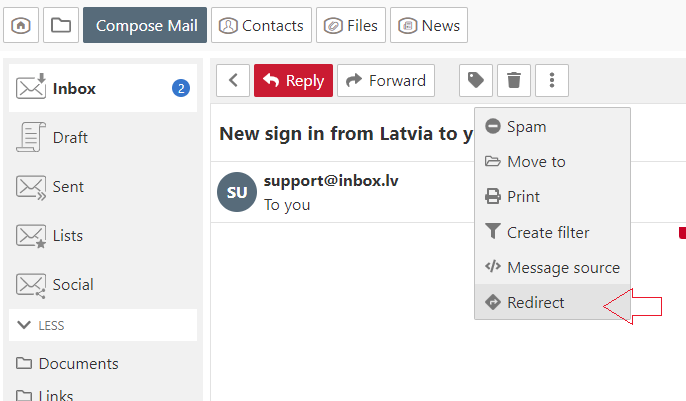
Перенаправить письмо

  1. Open the message,
  2. In the menu choose "More" and click "Redirect",
  3. In the new opened window in the  "To" field specify the recipient. If you want to redirect the email to multiple recipients, separate e-mail addresses with a comma,
  4. Click the "Redirect" button.


En caso de que no hayas encontrado respuesta contacta con nosotros
Preguntas

How to disable AdBlock program?
Сообщение о блокировке веб-страницы
Просмотр всех непрочитанных писем в папке
Letters and pictures size on the computer screen
Перенаправить письмо
Сортировка писем в ящике
Моё имя/фамилия при отсылки отображаются неправильно
Автоответчик
Пометить письмо как
Threads
Kuidas tühistada postkasti staatust "Mitteaktiivne"?
Inscribirse Entrar

  • Inbox.lt
  • Correo
  • Negocio
  • Archivos
  • Citas
  • Contactos
  • Calendario
  • Shortlink
  • Mgames
  • Noticias

  • Contactos
  • Apoyo técnico
  • Anunciando
  • Privacidad
  • Términos del Servicio

Descargar las aplicaciones